Free Built for focused job seekers
Every application. One clear pipeline.
Applytrack replaces the messy spreadsheet. Log each role in seconds, move it from Applied to Offer on a drag-and-drop board, and never miss an interview again.
- No credit card
- One-click Google sign-in
- Private to your account

Track roles from wherever you find them
- Indeed
- JobStreet
- Himalayas
- OnlineJobs
- Referrals
- Company sites
Features
Everything your job search needs. Nothing it doesn't.
A focused workspace that keeps you organized from the first application to the signed offer.
-
Drag-and-drop board
See your whole pipeline at a glance. Drag a card from Applied to Interview and the status updates instantly.
-
Powerful list view
Search, filter by status, sort by date or salary, and page through dozens of applications without losing your place.
-
Interview rounds
Log every round — HR, technical, final — with dates, results and notes. Upcoming interviews surface automatically.
-
Stale-application alerts
Applications sitting too long in one stage get flagged, so you know exactly when it's time to follow up.
-
Salary & work setup
Record expected pay plus Remote, Hybrid or Onsite so you can compare offers side by side when it counts.
-
Archive, don't delete
Close out rejected or ghosted roles to keep your board clean — and restore them anytime from the archive.
Your pipeline
Know exactly where every application stands
Eight clear statuses, color-coded across the board, list and dashboard — so nothing slips through the cracks.
-
Applied
You've sent it. Applytrack starts counting the days.
-
Screening
A recruiter replied. Keep notes on the first call.
-
Interview
Log every round with time, type and result.
-
Offer
Compare pay and terms before you decide.
Then close it out:
- Accepted
- Rejected
- Ghosted
- Withdrawn
Every detail, in one drawer
All the context, right when you need it
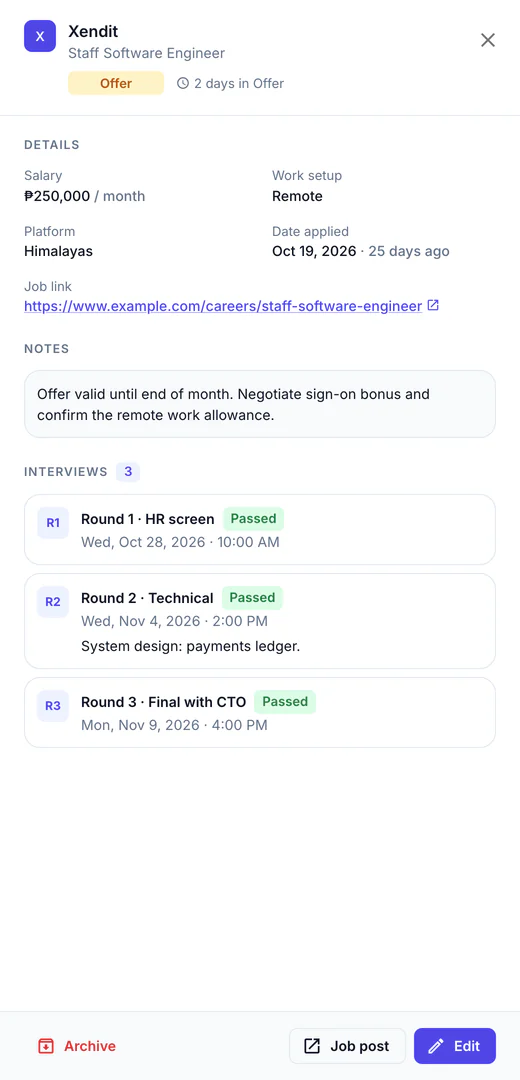
Open any application to see the full story — the role, salary, where you found it, every interview round and your private notes.
- Round-by-round history — type, schedule and pass/fail for each stage.
- Change status inline — from the table, the board or the detail view.
- Notes that stay put — negotiation points, recruiter names, prep ideas.
Stay ahead
Never miss an interview — or a follow-up
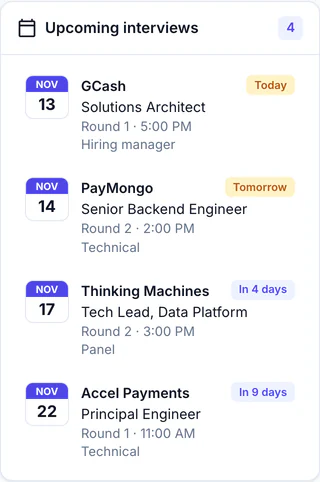
Your upcoming interviews are always one glance away, and quiet applications get flagged before they go cold.
- Upcoming panel sorted by date, with "tomorrow" highlighted.
- Days-in-status counter on every card.
- Live stats showing how your pipeline is converting.
How it works
Up and running in under a minute
No setup, no imports, no passwords.
-
Sign in with Google
One click and you're in. Your data stays private to your Google account.
-
Add your applications
Company, role, salary, platform and link — capture each one in seconds.
-
Move them forward
Update statuses, log interviews and watch your pipeline progress to an offer.
FAQ
Questions, answered
Is Applytrack really free?
Yes. Applytrack is free to use and doesn't ask for a credit card.
Who can see my applications?
Only you. Your applications, interviews and notes are tied to your Google account and aren't shared with anyone.
Why sign in with Google instead of a password?
It's faster and safer. There's no new password to remember or leak — Google handles sign-in, and Applytrack never sees your Google password.
What happens to rejected or ghosted applications?
Mark them Rejected, Ghosted or Withdrawn to close them out, then archive them to keep your board clean. You can restore anything from the archive later.
Can I track multiple interview rounds for one job?
Yes. Log as many rounds as you need — each with its own type, date and time, result and notes.

Your next role starts with a clear plan
Stop juggling tabs and spreadsheets. Bring every application into one place today.
Get started with GoogleFree to use · No credit card · No passwords